
Established 1992
 |
Mark H. Hayden 23227 Drywood Crossing Ct. Spring, Texas 77373-8142 Home: (317) 892-4516 Cellular: (317) 446-9300 |
|
|
Mark H. Hayden 23227 Drywood Crossing Ct. Spring, Texas 77373-8142 Home: (317) 892-4516 Cellular: (317) 446-9300 |
Did you get an unsolicited call from Microsoft ? No you didn't ! HANG UP !
Did your Screen tell you to call a number? Shut off your PC and call me !
Antivirus, Backups, Cookies, Disclaimer, Fees, Firewalls, Maintenance, Malware, Pop-ups, Porn, Power, Programs, SPAM, Spyware, Temporary Internet Files,
Microsoft's Safety and Security Page: 
check these first Malware, Antivirus, Spyware,
 Mark-et al. Home Page
The first question I usually ask on a trouble call is "How up to date is your antivirus?"
I recommend Microsoft Security Essentials on all Vista and Windows 7 systems. AVG for any XP systems.
Windows 8 and 10 come with Microsoft Security Essentials built in and they now call it Windows Defender,
any other antivirus on Windows 8 or 10 should be uninstalled Microsoft will automatically see you nedd protection and turn itself on
otherwise go to Control Panel, Action Center, Security, and turn on Defender
Anti-Virus software should be UPDATED atleast once a month either manually or automatically.
If you dont know about your antivirus or know if or when or how it is updated, then this is the number one issue to handle
There are several other good anti-virus programs, to include some of the following:
Avast *FREE*,
AntiVir Personal *FREE*,
BitDefender *FREE*,
Grisoft AVG *FREE*,
Microsoft Security Essentials *FREE*,
Kaspersky,
Mcafee Antivirus,
Panda Software,
SRN Micro Solo Antivirus,
Symantec Norton Antivirus,
Trend Micro,
Editorial comment: I have used Panda , Norton, Mcafee, AVG, and PC-cillin on my own machines
The new versions of Norton and Mcafee can use easily 7% of system resources and bring older systems to a crawl.
Grisoft AVG *FREE*,
Microsoft Security Essentials *FREE*,
You can also scan your system for viruses on-line using the internet links below for the same companies
Avast,
Kaspersky
Mcafee Stinger,
Panda Software,
RAV,
Symantec Norton Antivirus,
Trend Micro,
Trojanscan,
| Feature articles from Other sites |
Why do virus writers do the things they do?, Cnet 07/29/05 concerning virus software, Anti-Virus Software Review, Today's Norton antivirus, unusable by normal humans, |
Protecting your data should be of the utmost importance to everyone "How can I save my important files?"
Backups are sometimes a pain to do and are time consuming, but I suggest one of two options!
Commercially you can't beat Carbonite.
For just $60 per year it takes care of everything. They have a free trial available.
This program is automatic and stores all files off site, so that theft, fire, tornado, or viruses will not destroy your data.
If you get a nasty virus like the crypto virus they will gladly help you get back everything as it was before the Virus attack.
Call me for pricing, I offer a 10% discount on Carbonite signups or renewals.
If you want to do it yourself it can be quite a task. Make sure to copy all the folders under C:\Users\Yourname plus any folders on the PC
you may have stored in another location. Be aware that some older programs like old Quicken and QuickBooks do not store their data
in the MyDocuments folder. And some Programs like Kodak may store their data under the Public User folders.
You can copy all these files to an external HD or a memory stick, But ask yourself..... where will my backup file be in the case of a fire or
theft or a tornado? with the computer and in the same shape... Carbonite keeps your files safe and offsite and cheaper than an external Drive.
Editorial comment: Backups can be a hard lesson to learn about, when your system crashes and nothing can be recovered from it.
I have seen people buy external drives with backup software only to find out when it was crisis time they never backed up a single file.
Check your manual backups to see if you can locate your files and try to recover one to make sure it works as you think it should.
One of the new Crypto Viruses on the internet can easily scramble your entire hard drive and the external backup drive with no chance of recovery except by using Carbonite.
Your computer is NOT the place to store 10 years of family photos. Burn them to a CD immediately for safe keeping.
BACKUP TODAY! and as often as possible so you dont lose any data!
Get Carbonite Here.
"HELLO, my name is "BOB" and I am from Microsoft. Your computer is having lots of errors. Let me show you"
#1 How did they get my number? #2 How do they know there are errors, #3 OMG microsft is calling me???
Well, relax. If a stranger knocks on your door and says your carpet is about to catch on fire, do you let them in??? NOT ME !!
#1 BOB probably has a foreign accent that you can hardly understand. Microsoft is in the state of Washington in the USA.
#2Anybody with a phonebook has your number and everybody in India or Russia or China can access numbers over the internet.
Heck just dial a random number, somebody is bound to answer. they even call cell phones and unlisted numbers so dont feel special
#3Microsoft will never call you so it is not them! But Microsoft does put error reporting into windows, so that is where
the hacker will send you to get your confidence. He will ask you to look at the error report so you see the errors reported (yes there are a lot of them).
Once they have your confidence they are legit, they want to access your computer and load their programs for you.
Now that they have access to your machine they are done and wil try to charge you hundreds of dollars for their work.
If they get your credit card you have been hacked twice. PLEASE- Do not fall for this scam, just hang up on them as soon as they call you.
Editorial comment: If your computer is ever compromised turn it off immediately. restart and run malwarebytes, do an update, SCAN your PC. CALL ME!
If you gave them a credit card, Call your credit card company and try to cancel the charge and get a replacement card immediately.
| Feature articles from Other sites |
Microsoft Impersonation Scam, Consumer Reports - scam 2, Better Bussiness Bureau, AARP Top 10 Scams, |
Should I delete or be concerned about my cookies?"
A cookie is a short piece of data, which is sent from the internet to your computer when you visit some websites.
The cookie is stored in your PC, but it is not an executable program and can not load viruses or do anything to your machine.
For example, cookies are used to personalize Web Pages and Web search engines, to allow users to participate in WWW-wide
contests (but only once!), and to store shopping lists of items a user has selected while browsing through a virtual shopping mall.
To delete Cookies: In Internet Explorer, go to Tools, Internet Options, on the General Tab, hit the Delete Cookies Button
To Stop Cookies: In Internet Explorer go to Tools, Internet Options, on the Privacy Tab, click advanced, Override, Block both, then OK
Editorial comment: Don't mess with them! enough said. they are small and don't use much space.
Cookies are required by some web sites in order to even bring up the site.
Changing cookie settings can really mess up browsing and online forms etc.
Chances of misuse are minimal and there are more reasons to worry about viruses, malware, and spyware than cookies.
| Feature articles from Other sites |
Another question I get frequently is "What is a firewall and do I need one?"
Firewalls are intended to keep unauthorized users and programs from accessing your computer through the internet.
Unfortunately the only way a good firewall knows the difference between a good program and a bad one is to ask you the first time a program runs.
This can be both annoying and confusing for most users since most users dont know a good program from a bad one anyway.
Windows includes a generic firewall which should be turned on.
Editorial comment: I only recommend you just use the windows built in firewall.
I do not encourage the use of "system Works, Internet Security, Security Center" types of products at all.
These programs tend to be far too invasive and are usually redundant to windows accessories.
A lot of them also cause problems sharing files and network printers as well.
Antivirus apps may be malware in disguise
Malware is just that Mal like in Malicious, Ware as in software. Bad-Software.
It comes from bad websites or even good web sites that have been hacked, or as add-ons to other downloads you are getting online.
A dangerous new virus is making the rounds in the guise of a legitimate antivirus program.
Going by such names as "Antivirus 201?" and "Protector 201?," or "Security Tool," this malware, succeeds by looking like a legitimate Windows program.
Rogue antivirus programs such as these are being promoted through spam messages that link to an automatic download of a virus installer.
With such aggressive methods afoot to fool security-minded users, how do you know when an antivirus product is legitimate?
(1) Only use the programs listed here or from reliable sources.
(2) Never assume "WINDOWS" is telling you to load something you don't know about.
(3) Don't open emails you dont know about, and dont click on any links in an email unless you know in advance what to expect
(4) Call ME first! before loading anything you don't recognize
Try using the following program to remove them. I would UPDATE and then SCAN monthly just to be sure your system stays clean
Malwarebytes *FREE* Note: There is no need to Buy or upgrade to the premium edition! Save your money and scan once a month.
This is a computerized version of the foreigner calling your personal phone to tell you you have a computer problem. See Unsolicited Calls.
In this version a Pop-Up shows up on your screen to tell you that your computer is infected with a virus, or has severe problems or is in danger
of a major melt down. But don't worry they give you the answer right there on the screen, Just call this phone number to have it fixed for you right away.
IT'S A SCAM !!!!!! DO NOT CALL!!!!!
Amazingly "BOB" in India will answer the phone. Notice the hard to understand accent of his voice. He will tell you he is there to fix everything
and want access to your computer. Just like with the phone call above, he wil load his programs on your computer and demand a credit card number
so that you can be hacked a SECOND time!!!!!!!
Editorial comment: If your computer is ever compromised turn it off immediately. restart and run malwarebytes, do an update, SCAN your PC. CALL ME!
If you gave them a credit card, Call your credit card company and try to cancel the charge and get a replacement card immediately.
Most browsers today have blocked the majority of pop-ups created by websites. If you are still getting an overwhelming number
check your pop-up stopper settings in your browser. In Internet Explorer click tools, then Pop-up Blocker, to make sure it is on.
You can allow specific sites to show their pop-ups at the same place and going to settings to only allow that site's pages.
Editorial comment: Most pop-ups today are caused from Spyware or malware, check the section on Malware
If you get a message that says a pop-up has been stopped and you want to see it, click on the notification bar and then click
"allow once" or "always allow popups from this site" if you must. Do not completely turn off your popup blocker!
I have children on the computer "How do I protect them from bad sights?"
There are many programs out there for "Parental control" so your kids don't see the wrong things.
A+ Premium Christian Internet Filtering by HEDGEBUILDERS.COM,
Safe Eyes as recommended by Dave Ramsey,
Net Nanny,
Bsecure,
CyberSitter,
CyberPatrol,
KidsWatch,
Additionally, you can filter access through Internet Explorer. To do that, first click Tools>>Internet Options.
Select the Content tab and click Enable. Select the General tab. Click Create Password.
Enter your password and hint, and click OK.
Internet Explorer's filter works with the Internet Content Rating Association.
More information on this organization is available at:
To set the IE filter, click Tools>>Internet Options. Click Content and select the Ratings tab.
Select one of the four categories and move the tab by clicking where you want it.
Internet Explorer can also provide you with a whitelist. That lets you decide what sites your children can visit.
Once again, go into Content Advisor. Select the Approved Sites tab. Enter the sites of which you approve one-by-one.
Click Always after each. When you finish, click OK.
Accidents happen, and some legit web searches could lead you astray very easily.
As far as I'm concerned the only good filter is the one watching over their shoulder.
Malware also causes porn to be shown, Run Malwarebytes *FREE*
also be aware of bad sites intentionally meant to trick you
like "whitehouse.COM" and "nasa.COM" that should be "whitehouse.GOV" and "nasa.GOV"
the .COM sites will generally lead you to PORN sites. Please be aware of the schemes to decieve you.
Should I leave my computer on all the time, or turn it off in storms?"
My answer is: IF you turn on the PC during the day, then leave it on until you go to bed. Then turn it off.
Two reasons:
1) Most power surges come while turning on most appliances.
--------------Remember seeing most light bulbs blow as you turn on the light switch.
2) Most everything from your PC to your car to even yourself is rated in hours of operation before failure.
--------------So why run the machine while you are sleeping and at the office
And yes by all means unplug your PC during storms, and also unplug the phone line from the modem.
Most damages come from the phone line into the PC modem, or from power failures causing unexpected shut downs.
You can NOT stop lightning no matter what devices you use but a good UPS and unplugging the system works the best.
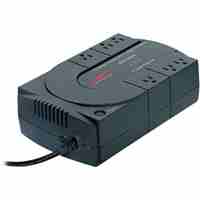
Editorial comment: If you have a DESKTOP computer, then you should have a UPS to plug it into. NOT just a power strip.
A 350VA to 500VA model is usually sufficient and will protect your machine from most power and phone line related problems.
Usual price is $40.00, and it is not uncommon to get them for $25.00 or even "free after rebate" in most stores around Thanksgiving.
These units have phone line protection and a cable to tell your PC to shut down properly if your power does goes out and stays out.
I cant find my email for all my emails "How do I get rid of all this junk email?"
Apparently Congress and their famous anti-spam law can't even answer this one.
AOL was leading a tough battle to help minimize SPAM (junk mail), but until that is resolved
Lots of free web based email services now include SPAM filters also, I feel the best email filtering is now from Gmail.
If you are using Outlook or Outlook express consider the email filter found in Tools, Rules, Email.
By typing in a word list the emails are filtered by subject or body content and can be deleted if offensive words are found.
DO NOT Unsubscribe to SPAM
One of the spammers' nasty tricks is to get you to "unsubscribe" so they can validate your e-mail address.
If you respond, they've connected; you are a real person. They can add your e-mail address to a list that they will use or sell.
On the other hand, a company you know and trust may inadvertently spam you due to inept e-mail management.
By responding, you've done them a service. So, to reiterate, if you don't recognize the mailer, you probably shouldn't "unsubscribe."
Editorial comment: For Outlook or Outlook Express go to Tools, then Rules, then Mail,
and add filter words to catch the junk mail then delete it or move it to a SPAM folder for your review.
For a software solution I recommend Spamfighter *FREE*. Just use the free version.
Microsoft lists these possible spam programs:
Spam Buster, from Contact Plus. A filtering service that gets high marks from ZDNet.
MailWasher. A free e-mail checker that can eliminate spam and viruses (this company gladly accepts donations).
ePrompter. Another free service that enables you to see e-mail headers from multiple accounts before the messages hit your inboxes, so you can kill it for good in advance.
Spamex. For a small fee, you use disposable e-mail addresses that forward messages to your real e-mail address, which you keep hidden.
SpamCop. A spam reporting and filtering service, for a nominal price.
Brightmail. This spam-detection and filtering service for ISPs is now offered free to customers of Verizon's dial-up and DSL service.
| Feature articles from Other sites |
"What is a spyware and how do I delete it?"
The next biggest problem that I run into after Viruses and Malware is Spyware
Spyware is a program that "SPYS" on your internet activity and sends information back to a "Not so friendly" monitoring company.
Spyware will usually generate lots of POP-UPS and/or changes your internet settings to benefit the advertiser.
Spyware will also slow down your machine to do all this, so having 15 or 20 of these programs can have big impacts on your system performance.
The biggest Spyware sponsers are (1) KaZaa, (2) GATOR (Gain), (3) Grokster, (4)Net Pal, and (5)DoubleClick.
Other programs to watch for include tool bars and search bars that promote a "better or faster internet experience"
If a web site wants you to download a special viewer or program for their sight just close the box, don't even answer no.
I use several Spyware removal programs such as these below:
Spybot Anti Beacon *FREE*, Spybot *FREE*, Superantispyware *FREE*, Spyware Blaster *FREE*, Hitman Pro*FREE Trial*,
Click here for my instructions on running each of these programs.,
Click here to see comparison of different spyware programs.,
Editorial comment: UPDATE your programs each time you use them and use them atleast once a month.
I highly recommend using MalwareBytes for searching your computer for unwanted programs.
I also use Spyware Blaster to block some programs from entering the PC, like Spybot's Immunize.
Spykiller tried to mark several legitimate files on my system as spyware which were not, so I would avoid this program.
Spykiller
| Feature articles from Other sites |
"What should I do to keep my PC up to date?"
Just like your car needs oil changes your PC needs maintenance too.
Once a month I recommend running the following:
Disk Cleanup -> Start, Programs, Accessories, System Tools
Scandisk -> Start, Programs, Accessories, System Tools
Defrag -> Start, Programs, Accessories, System Tools
*note* Scandisk & Defrag sometimes need to be run in safe mode, otherwise they will continue to restart and never finish.
For safe mode: Keep hitting F8 on your keyboard just as your computer starts to boot up (before the Windows "splash screen" appears).
A menu should come up. Choose the SAFE MODE. Restart your computer when finished.
Windows updates -> Windows Updates or http://windowsupdate.microsoft.com, Get ALL of them in each of the categories except foreign languages.
Windows 10 will do it automatically
Anti-Virus Updates -> good programs should update themselves, but it is a good idea to manually make sure they are updating regularly.
Malwarebytes -> in the maintenance folder on the desktop
Spywareblaster -> in the maintenance folder on the desktop
Spybot Search and Destroy -> in the maintenance folder on the desktop
Editorial comment: I cannot stress enough the importance of a backup done atleast once a month.
see the section on backups
"What other programs do you recommend?"
Open Office as a good replacement for Microsoft office or Works or Corel Suite
Slideshow program for all your pictures, add music too.
do the messenger, MSN, AIM, YAHOO, IRC, ICQ, all in one list
Compare MSCONFIG to this sight to see if you have extra programs running
Shut down Microsoft vulnerabilities with DCOMbob
Editorial comment: Programs can act or interact differently on different systems and with other software.
Please consider these programs carefully to see if they meet your needs as well as they did on mine or my other customers.
Fees
I sure need someone to come fix my machine "How much do you charge?"
I have been doing this since 1992, part time in the evenings and weekends and had more than 1250 clients in Indiana.
In 2015 I moved to Spring Texas and will see how quickly the business grows from there.
I have gradually increased my fees as knowledge, experience and gasoline prices have increased.
I charge $50 for a trip charge to cover basic business expenses like car, gas, cell phone, etc.
This is charged only once a month even if return trips occur.
For business systems the service fee is $60/hour as they tend to be more complex than home visits
For home systems it is $40/hour plus any parts needed.
Rounding to the nearest quarter hour from the time I arrive until the time I leave. No matter where you live.
I know every call is important and nobody wants to be without their computer any longer than they must.
I prioritize calls by importance and location, where businesses usually come first and dead machines take priority over updates.
I not only clean and optimize your system but will also give you all the tools you need to keep it that way.
I will do my best to answer your questions over the phone if I can to save a service call and to get you up and
running as quickly as possible. Realizing that it takes considerably longer to talk somebody through step by step
of every screen needed to do a process. I may feel it is just quicker to make the service call than to try remedies over the phone.
Editorial comment: If for any reason you are not satisfied, I hope you will let me know what happened and how you would like it fixed.
Although machines and programs will do as they like, I will always do everything possible to make your machine work to its best ability.
Changes can always be made to the machine so it is the way you like it, and I will always do what I can to optimize your PC for its performance.
I never stop being amazed at how Apple, Microsoft and other companies can make so many programs and machines that seem to all work so well
considering the millions of users and all the different ways PCs are used. You will probably not find any two machines set up the exact same way
since it would be so hard to get agreement on the BEST way to do everything. All of my OPINIONS and repairs are based on my years of accumulated
knowledge and experience and on what has worked the best on all other machines. Customers also give me feedback on good and bad effects to their
machines as well. If you have comments or feedback, please feel free to contact me so I can learn from your experiences as well.
email me here!
Call today for more information today (317)892-4516.
This page, and all contents, are Copyright © 2016 by Mark-et al., Spring, Texas, USA
 Send Mark-et al. E-Mail